


How AI CRM Automation Helps Businesses Improve Sales and Productivity
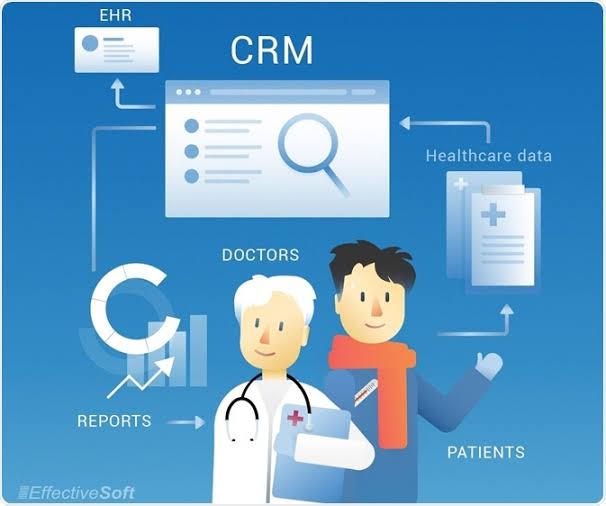
Businesses today manage large volumes of customer information, sales activities, follow-ups, and communication across multiple channels. Handling these tasks manually can consume valuable time and make it difficult for sales teams to focus on building relationships and closing deals. AI-powered CRM automation offers a practical way to reduce repetitive work, organize customer data, and improve sales productivity. When combined with effective CRM UI UX design, these technologies can make everyday business operations more efficient and easier to manage.
For businesses across the United States and Canada, customer relationship management software has become an important part of modern sales operations. However, simply adopting a CRM platform does not guarantee better results. Companies need automated workflows, useful customer insights, and an interface that helps employees understand what actions to take next.
By combining artificial intelligence with thoughtful CRM workflow design, organizations can improve lead management, personalize customer interactions, forecast sales opportunities, and reduce administrative overhead. The key is to use automation to support employees rather than introduce unnecessary complexity into their daily work.
1. Understanding AI-Powered CRM Automation
AI-powered CRM automation combines customer relationship management software, workflow automation, and artificial intelligence to help businesses manage customer-related activities more efficiently.
Traditional CRM automation follows predefined rules. For example, a system might assign a new lead to a sales representative based on location or send a reminder when a follow-up date approaches.
AI-enabled CRM systems can go further by identifying patterns, generating summaries, suggesting next steps, classifying customer inquiries, and helping teams prioritize opportunities based on available information.
Common applications include:
-
Automated lead scoring and prioritization.
-
Customer communication summaries.
-
Sales forecasting and pipeline analysis.
-
Follow-up reminders and task recommendations.
-
Email drafting and conversation assistance.
-
Customer segmentation and behavioral analysis.
-
Automated data entry and record enrichment where supported.
These capabilities help employees spend less time managing information and more time acting on it.
However, the effectiveness of AI CRM automation depends on data quality, appropriate configuration, and employee understanding. Businesses should select features that address specific operational problems rather than introducing AI simply because it is available.
2. Automating Lead Management and Qualification
Lead management is one of the most time-consuming parts of the sales process. Sales teams often receive inquiries through website forms, email campaigns, social media, referrals, and other channels.
Without an organized process, promising leads may receive delayed responses or remain unnoticed in the CRM.
AI-powered lead management can help centralize incoming inquiries, categorize prospects, and identify which leads deserve attention first.
For example, a B2B software company might use available information about a prospect's industry, company size, stated requirements, and engagement history to prioritize leads for review. The sales team can then focus on prospects who appear more closely aligned with its ideal customer profile.
Automated lead assignment can also distribute opportunities according to territory, specialization, workload, or other predefined criteria.
This process works best when qualification rules are transparent and employees can review the information behind important recommendations. AI-generated scores should support sales judgment rather than automatically determine which customers receive attention.
A well-designed CRM interface makes lead status, ownership, qualification details, and recommended actions easy to understand.
3. Reducing Administrative Work for Sales Teams
Sales representatives frequently spend time updating records, documenting meetings, preparing reports, and organizing follow-up activities. Although these tasks support the sales process, excessive administrative work can reduce the time available for meaningful customer conversations.
CRM automation can reduce this burden by handling routine activities.
Depending on the platform and its integrations, automation may record activities, generate call summaries, create follow-up tasks, update selected fields, and prepare routine reports.
For example, after a customer meeting, an AI assistant may summarize the discussion and identify potential action items. The representative can review the summary, correct inaccuracies, and save the approved information to the appropriate customer record.
This approach reduces repetitive documentation while keeping employees responsible for the accuracy of important records.
Businesses should also examine how automated features appear within the CRM. If employees must navigate several screens to review or approve generated information, the automation may create additional work instead of reducing it.
Effective CRM UI UX design places relevant automation controls within existing workflows and makes review, correction, and approval straightforward.
4. Improving Sales Follow-Ups and Customer Engagement
Timely follow-ups are essential for maintaining momentum throughout the sales process. However, representatives managing numerous opportunities may struggle to remember every conversation, deadline, and customer requirement.
AI-powered CRM systems can help identify upcoming activities, suggest follow-up tasks, and highlight opportunities that have not received recent attention.
For example, a CRM might flag a prospect whose requested proposal has not been followed up on or remind an account manager about an upcoming contract renewal.
Automation can also help prepare personalized communication using relevant customer information and previous interactions.
Nevertheless, personalization should go beyond inserting a customer's name into a standard email. Useful communication reflects the prospect's actual needs, previous discussions, and stage in the buying process.
Employees should review AI-generated messages before sending them, especially when they contain commercial commitments, pricing information, or sensitive customer details.
Businesses should also avoid excessive automated messaging. Frequent or irrelevant follow-ups can damage customer trust.
The goal is to make communication more timely and relevant while preserving the human judgment needed to build lasting business relationships.
5. Using AI to Improve Sales Forecasting
Accurate sales forecasting helps businesses plan revenue, allocate resources, and make informed operational decisions.
Traditional forecasting often relies on historical results, representative estimates, and current pipeline values. AI-assisted forecasting can analyze additional patterns in available CRM data to identify potential risks and opportunities.
Depending on the system, these insights may include changes in opportunity activity, historical conversion patterns, sales cycle duration, and differences between expected and actual results.
For instance, a sales manager may receive an alert that several high-value opportunities have remained inactive longer than similar opportunities that historically progressed to a successful outcome.
This information can help managers investigate stalled deals and provide targeted support.
However, AI forecasts are not guarantees. Incomplete CRM records, changing market conditions, unusual sales cycles, and biased historical data can affect their reliability.
Businesses should compare forecasts with actual outcomes, understand the limitations of their models, and allow managers to apply relevant context.
Clear dashboard design is equally important. Forecasts should present assumptions, confidence indicators where available, and useful breakdowns rather than overwhelming managers with unexplained numbers.
6. Enhancing Customer Segmentation and Personalization
Customers differ in their needs, preferences, purchasing behavior, and expectations. Treating every prospect or account in exactly the same way can make sales and marketing communication less effective.
AI-powered CRM tools can help businesses organize customer information into meaningful segments.
Depending on available data and system capabilities, segmentation may consider industry, company size, purchase history, engagement patterns, product interests, or lifecycle stage.
A B2B company, for example, might identify existing customers who could benefit from an additional service based on their current products and stated requirements.
Sales and marketing teams can use these insights to prioritize relevant conversations and tailor their outreach.
Personalization should remain appropriate to the relationship and the information the business is authorized to use. Companies should respect applicable privacy requirements and avoid making unsupported assumptions about individual customers.
The CRM interface should also explain why a segment or recommendation is relevant when possible. This helps employees assess whether an AI-generated suggestion makes sense before acting on it.
7. Integrating CRM Automation With Existing Business Tools
Many businesses use separate platforms for email, calendars, marketing automation, customer support, accounting, and project management.
When these tools operate independently, employees may need to copy information between systems or search multiple applications to understand a customer's situation.
CRM integration services can help connect relevant business systems and reduce unnecessary data duplication.
For example, integrating a CRM with a calendar may make meetings and follow-up activities easier to track. Connecting customer support software can provide sales representatives with visibility into relevant service cases. Marketing integrations can help teams understand which campaigns have generated customer engagement.
AI features may become more useful when they can work with accurate, appropriately connected information from these systems.
However, integration requires careful planning. Businesses should define which system owns each data field, how updates are synchronized, and how duplicate or conflicting records are handled.
Access permissions and data security must also remain consistent across connected platforms.
A well-designed CRM experience should make integrated information easy to find without forcing users to understand the technical complexity behind the connection.
8. Making AI Automation Easy to Use Through Better CRM UI UX
Advanced automation delivers limited value if employees cannot understand or use it effectively.
CRM UI UX design helps translate complex capabilities into clear, practical interactions. Employees should understand which tasks are automated, which decisions require their approval, and how to correct an inaccurate result.
Several design principles can improve the experience.
Clear recommendations
AI-generated suggestions should explain their purpose in understandable language. Instead of displaying an unexplained priority score, the CRM might identify relevant factors contributing to a recommendation when those details are available.
Visible automation status
Users should be able to see whether a task is pending, completed, unsuccessful, or awaiting approval.
Simple review and correction
Employees need straightforward ways to verify generated summaries, correct customer details, and reject unsuitable recommendations.
Relevant notifications
Alerts should prioritize important actions and avoid unnecessary interruptions.
Consistent workflows
AI features should fit naturally into familiar CRM processes rather than requiring employees to learn an entirely separate interface.
When automation is understandable and predictable, employees are more likely to trust it appropriately and use it consistently.
9. Protecting Customer Data and Managing AI Risks
AI-powered CRM automation can involve personal information, commercial records, customer conversations, and sensitive business details. Organizations should therefore establish clear rules for how this information is collected, processed, stored, and accessed.
Start by reviewing the privacy, security, and data-handling capabilities of the CRM provider and any connected AI services.
Businesses should consider role-based access controls, data retention policies, audit logs, secure integrations, and appropriate restrictions on sensitive information.
They should also determine whether customer data may be used to train external AI models and review the relevant contractual terms and settings.
Human oversight is important when AI-generated outputs influence consequential decisions. For example, an automated recommendation should not be treated as unquestionable evidence that a prospect is unsuitable or that a customer presents a particular risk.
Organizations operating in the United States and Canada should assess the privacy and other legal requirements applicable to their operations, customers, and data practices.
Clear governance helps businesses capture the benefits of automation without overlooking customer trust or accountability.
10. Measuring the Business Impact of AI CRM Automation
Implementing AI features is only the beginning. Businesses need to determine whether automation is actually improving sales performance and employee productivity.
Before launching a new feature, establish a baseline for the process it is intended to improve.
Useful metrics include:
-
Time spent on administration: Measure how much time employees spend updating records and preparing routine documentation.
-
Lead response time: Track how quickly incoming inquiries receive an appropriate response.
-
Follow-up completion: Monitor whether planned sales activities occur on schedule.
-
Conversion rates: Evaluate how leads progress through the sales pipeline.
-
Forecast accuracy: Compare predicted outcomes with actual sales results.
-
Data quality: Assess record completeness, duplication, and accuracy.
-
Employee adoption: Determine whether staff members use the automated features consistently.
-
Customer experience: Monitor relevant feedback, response quality, and complaints about communication.
Results should be interpreted carefully. An improvement in one metric does not necessarily mean the entire sales process has become more effective.
For example, automated emails might increase response volume without improving qualified opportunities. Businesses should therefore evaluate productivity, sales outcomes, and customer experience together.
Regular reviews help identify which features are delivering value and where workflows need further refinement.
Common Mistakes to Avoid When Implementing AI CRM Automation
Even useful technologies can create problems when introduced without a clear plan.
Automating inefficient processes
Automating a confusing workflow may simply make the confusion happen faster. Review the process before implementing automation.
Relying on inaccurate data
AI recommendations are only as useful as the information supporting them. Establish data quality standards and address missing or inconsistent records.
Removing human oversight
Automated systems may produce incorrect summaries, misleading recommendations, or unsuitable messages. Define which tasks require human review.
Introducing too many features at once
A large number of new tools can overwhelm employees. Begin with high-value use cases and expand as users become comfortable.
Ignoring employee training
Explain what the automation does, how its recommendations should be interpreted, and when employees should intervene.
Measuring activity instead of outcomes
The number of automated tasks completed is not enough to demonstrate business value. Measure whether the system improves productivity, sales performance, or customer relationships.
Avoiding these mistakes helps organizations introduce AI in a controlled and measurable way.
Conclusion
AI CRM automation can help businesses improve sales productivity by reducing repetitive administrative work, prioritizing leads, strengthening follow-up processes, supporting forecasting, and making customer information more useful. Its effectiveness depends on reliable data, well-defined workflows, appropriate human oversight, and integrations that support existing operations.
For businesses in the United States and Canada, combining automation with intuitive CRM UI UX design is particularly important. Employees need to understand AI-generated recommendations, review information easily, and remain in control of important customer interactions.
By starting with clear business objectives, measuring results, and improving workflows gradually, companies can use AI-powered CRM tools to support more efficient sales operations and stronger customer relationships. Businesses can also work with digital solutions providers such as Soft-korner to explore CRM improvements that align technology, usability, and operational goals.
Frequently Asked Questions
1. What is AI CRM automation?
AI CRM automation uses artificial intelligence and automated workflows to assist with customer management tasks. Common applications include lead prioritization, activity summaries, sales forecasting, follow-up recommendations, and customer segmentation.
2. How does AI CRM automation improve sales productivity?
It can reduce repetitive administrative work, highlight promising opportunities, organize follow-ups, and help sales representatives access relevant customer information. This allows employees to devote more attention to customer conversations and qualified opportunities.
3. Can small businesses benefit from AI-powered CRM systems?
Yes. Small businesses can use suitable AI CRM features to organize leads, automate routine reminders, summarize interactions, and manage customer information. They should begin with features that solve immediate problems and fit their budget and operational requirements.
4. Why is CRM UI UX important for AI automation?
CRM UI UX determines how easily employees can understand and use automated features. Clear recommendations, visible task statuses, simple approval processes, and intuitive navigation help employees use AI tools effectively without adding unnecessary complexity.
5. How can businesses measure the success of AI CRM automation?
Businesses can track administrative time, lead response time, follow-up completion, conversion rates, forecast accuracy, data quality, and employee adoption. These measurements should be compared with a baseline and evaluated alongside customer experience and business outcomes.

 English
 Arabic
 French
 Spanish
 Portuguese
 Deutsch
 Turkish
 Dutch
Dutch
 Italiano
 Russian
 Portuguese (Brazil)
 Greek
Greek
