


What Should You Know Before Buying an Evolis Badgy 200?
A new hire needs a badge, a club member has lost their card, or an event suddenly needs ten more passes. If every card comes from an outside printer, even small requests mean waiting.
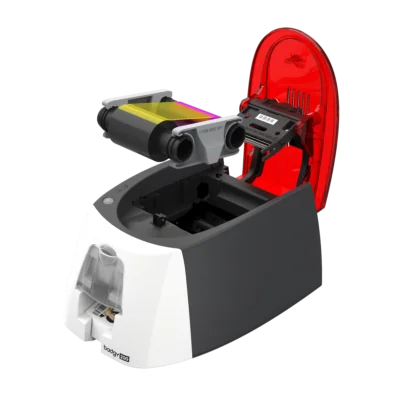
The Evolis Badgy 200 card printer lets New Zealand organisations produce personalised plastic cards in small batches, with the printer, design software and starter supplies in one package. Before you invest in an Evolis Badgy printer, work through these eight checks to see whether the Evolis Badgy 200 suits your needs.
1. Know What the Badgy 200 Is Built For
The Badgy 200 is a compact desktop printer, about 147 x 200 x 276 mm and 1.7 kg, for staff badges, membership cards, visitor passes and event passes. Its strength is letting you print approved cards on demand instead of ordering each one externally. It's designed for small to moderate volumes, so organisations needing continuous, high-volume production should look at heavier-duty equipment.
2. Check What's in the Box
According to Badgy New Zealand, the Evolis Badgy 200 package includes:
-
The Badgy 200 printer
-
100 blank white PVC cards
-
A colour ribbon for 100 prints
-
Evolis Badge Studio Plus software
-
Downloadable card design templates
That covers your first 100 cards. After that, you'll need replacement ribbons and cards, so if you're comparing reseller offers, check exactly what each one includes. Badgy also sells a full kit of 100 thick cards plus a 100-print colour ribbon, which makes reordering simple.
3. Match It to Your Monthly Volume
A small office printing ten cards a month has very different needs from a school producing hundreds at enrolment. The Badgy 200 prints a full-colour card in about 38 seconds, or up to 95 an hour, and its feeder holds 25 cards. Printing 40 new-starter cards at the start of the year, for example, would take around 25 minutes of print time at the rated speed.
That's plenty for steady small batches. Real-world output also depends on preparing designs, checking details and reloading cards, so estimate your typical month and your busiest week. The right printer should handle both without constant attention.
4. Review Print Quality and Card Appearance
The Badgy 200 uses colour dye sublimation for photos and graphics and monochrome thermal transfer for text. It also prints edge to edge, so coloured backgrounds and brand panels can cover the whole card, which suits membership and loyalty designs. A clear overlay panel on the YMCKO ribbon adds a protective finish to every card.
Good results still depend on sharp photos and well-prepared artwork. Ask your supplier for sample cards so you can judge readability and colour before you buy.
5. Make the Most of Badge Studio Plus
The included Badge Studio Plus software connects to Excel, so you can personalise a batch of cards from an approved spreadsheet instead of typing each one. That cuts repetitive data entry and keeps layouts consistent. Saved templates also mean any authorised staff member can issue an on-brand card, even if they didn't design it. It's useful for:
-
Staff ID templates
-
Membership cards with individual details
-
Visitor badges with names and photos
-
Event passes using a set layout
Always check imported data before printing. The software speeds things up, but it doesn't replace accurate records or an approval step.
6. Confirm Computer Compatibility
The Badgy 200 connects by USB 2.0 and is also compatible with USB 1.1 and 3.0, and both the printer and Badge Studio work with Windows and Mac. Its published specifications list older Windows and macOS versions, so don't assume it will run on the newest operating systems without checking. Ask your supplier about current drivers, software updates and installation support for your computers.
Also decide who will run the printer. If several staff need access, set clear rules for managing templates, cardholder data and printing permissions.
7. Know Its Limitations
The Badgy 200 prints on one side at a time. You can make double-sided cards by reinserting them, but there's no automatic duplex printing. It also has no magnetic stripe or smart card encoder, so it can print visible details, including black text on pre-encoded cards, but can't programme access credentials. If you use electronic access control, you'll need a separate encoding solution or a different printer. And it prints only on CR80 PVC cards (85.6 x 54 mm), not paper or other materials. Spotting these limits early avoids an expensive mismatch.
8. Work Out What an Evolis Badgy 200 Card Printer Really Costs
Buying an Evolis Badgy 200 card printer is only the first expense. Budget for:
-
Replacement colour ribbons
-
Blank PVC cards
-
Cleaning pens or cleaning cards
-
Reprints after mistakes
-
Staff time
As an illustration, a NZ120ribbonratedfor100printsworksoutatNZ1.20 per card before the blank card. That's an example, not a supplier price. For text-only cards such as visitor passes, a 500-print black ribbon lowers the cost per card.
Then compare the total with outsourcing. If you only need a handful of cards a year, a print shop may still be cheaper. If you issue cards regularly, or delays cause real problems, the convenience can justify the cost even when the savings are modest. The printer carries a one-year warranty, with optional extended cover.
Final Thoughts: Is the Evolis Badgy 200 Right for You?
The Evolis Badgy 200 is a practical choice for businesses, schools and clubs that want control over their ID cards in modest quantities. Badge Studio Plus, edge-to-edge printing and a compact footprint make it well suited to everyday card production.
Before you buy, confirm your volume, computer compatibility, card requirements and running costs. If they line up, an Evolis Badgy printer is an easy way to bring professional card printing in-house.

 English
 Arabic
 French
 Spanish
 Portuguese
 Deutsch
 Turkish
 Dutch
Dutch
 Italiano
 Romaian
 Portuguese (Brazil)
 Greek
Greek
